
There are no shortcuts to success. But handy tips and useful tricks can make our journey easy and worthwhile. Premium Zone is a section for our Premium Subscriber where they’ll be acquainted with various link building ideas and some of my hidden secrets.

How To Find Unlimited GOV and EDU Backlinks (My Hidden Secret)
[mepr-show rules=”1417″ unauth=”message”]
I am a big fan of Google search operators and use the same to find GOV and EDU backlinks. The search queries below can help you find link-building opportunities on GOV websites. You can also replace GOV with EDU in the given queries to find EDU backlinks.
• "keyword" blog site:*.gov.*
• keyword +inurl:blog site:*.gov.*
• inurl:.gov+inurl:blog
• site:*.gov.* inurl:wp-login.php
• site:*.gov.* inurl:blog "post a comment"
• site:*.gov.* "powered by yaf"
• site:*.gov.* "register.aspx"
• site:*.gov.* "post/?type"
• site:*.gov.* "index.php"
• site:*.gov.* "forums register"
• site:*.gov.* "You cannot post new topics in this forum"
• site:*.gov.* "BB code is On"
• site:*.gov.* "Thread is closed"
• site:*.gov.* "most online ever"
• site:*.gov.* "powered by vbulletin"
• site:*.gov.* "powered by yabb"
• site:*.gov.* "powered by ip.board"
• site:*.gov.* "boardbook.de"
• site:*.gov.* "powered by phpbb"
• site:*.gov.* “powered by invision power board”
• site:*.gov.* "powered by xmb"
• site:*.gov.* "powered by: fudforum"
• site:*.gov.* "powered by fluxbb"
• site:*.gov.* "powered by forum software minibb"
• site:*.gov.* "this forum is powered by phorum"
• site:*.gov.* "powered by punbb"
• site:*.gov.* "powered by quicksilver forums"
• site:*.gov.* “powered by seo-board"
• site:*.gov.* "powered by smf"
• site:*.gov.* "powered by ubb.threads"
• site:*.gov.* "powered by the unclassified newsboard"
• site:*.gov.* "powered by usebb forum software"
• site:*.gov.* "powered by xennobb"
• site:*.gov.* "powered by yaf"
• site:*.gov.* "Powered By MyBB"
• site:*.gov.* "Powered by IP.Board"
• site:*.gov.* "powered by phpbb"
• site:*.gov.* inurl:showthread.php
• site:*.gov.* "cgi-bin/forum/"
• site:*.gov.* "/forumdisplay.php?"
• site:*.gov.* "/misc.php?action="
• site:*.gov.* "member.php?action="
• site:*.gov.* "viewforum.php?id"
• site:*.gov.* "community/forum.php”
The steps followed by me in finding GOV and EDU backlinks are as follows:
Step 1: Use the queries to find GOV and EDU websites.
Step 2: Check out those websites for link-building opportunities.
Step 3: If you successfully find any link-building opportunity, copy any text from that page that seems to be common and search for it.
Say, for example, https://lms.stemlabs.edu.lk/community/profile/funwithbacklinks/ is a sample backlink.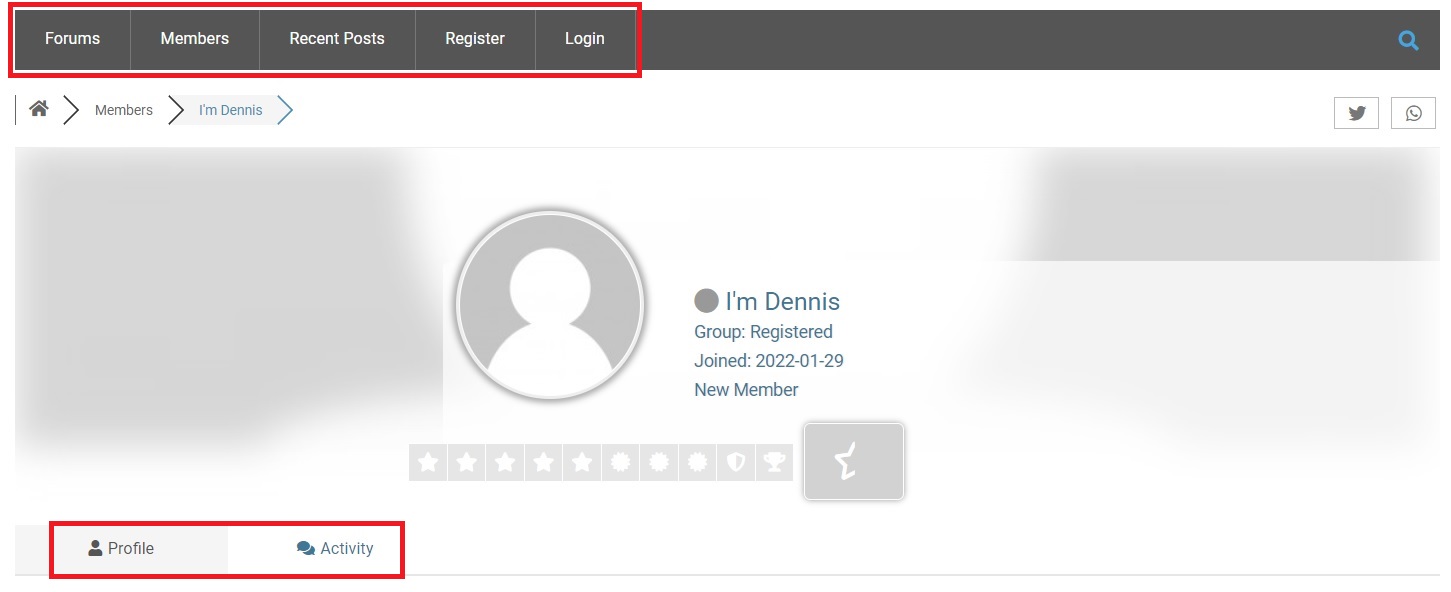
If you look at this picture carefully, you’ll get a feeling that words like Forums, Members, Recent Posts, Register, Login, Profile, and Activity could be common on several other websites. So, in that case, we can use a search query like:
site:*.edu.* "forums" "members" "recent posts" "register" "login"
site:*.edu.* "forums" "profile" "activity"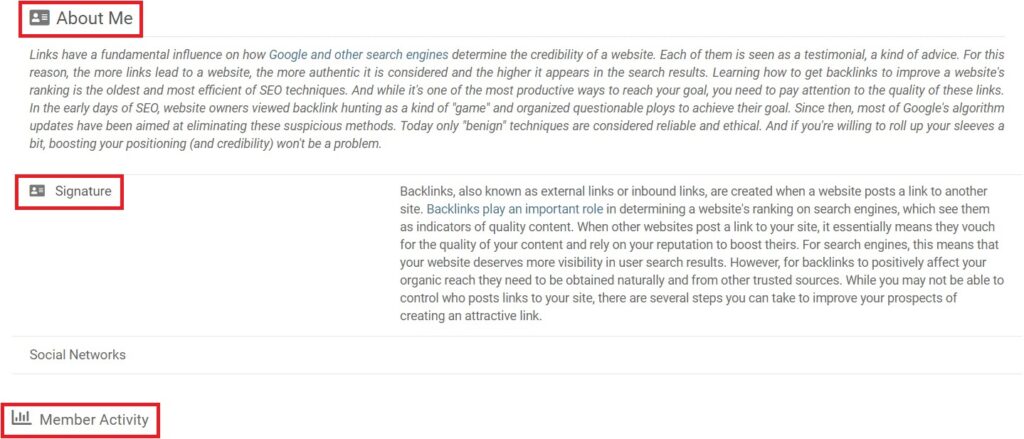
Similarly, if we scroll down, we can form another set of a search query like:
site:*.edu.* "about me" "signature" "member activity"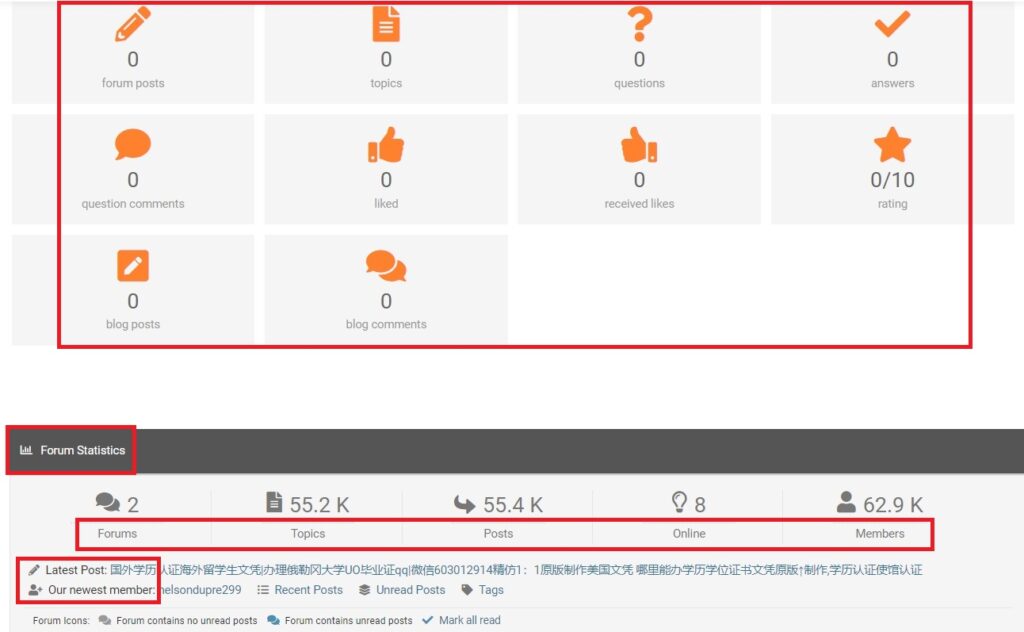
Scrolling down further, you can form another set of queries like:
site:*.edu.* "forum posts" "blog posts" "forum statistics"
site:*.edu.* "forums" "posts" "online" "members" "our newest member"
Step 4: Rinse and repeat
By following this trick, you can find unlimited GOV and EDU backlinks.
Question: What is the good thing about using Google queries for finding backlinks?
Answer: You’ll find link-building opportunities from websites that are already indexed. So if you create any backlink, you won’t have to worry about indexing the same.
[/mepr-show]
Smartest Way To Find Guest Post Opportunities
[mepr-show rules=”1417″ unauth=”message”]
Google loves relevant backlinks. And once again, Google operators will come to our rescue. Given below are queries that you can use to search for websites that accept guest posts.
• Keyword + allintitle:guest post guidelines
• Keyword + intitle:"write for us"
• Keyword + allintitle:guest blog guidelines
• Keyword + "Be a contributor"
• Keyword + "Become a contributor"
• Keyword + "Guest column"
• Keyword + "Guest columnist"
• Keyword + "guest blogger"
• Keyword + "Submit [Niche] News"
• Keyword + "Community News"
• Keyword + "Submit Blog Post"
• Keyword + "submit content"
• Keyword + "submit post"
• Keyword + "Suggest a Guest Post"
• Keyword + "Contribute to our Site"
• Keyword + "Become a Guest Writer"
• Keyword + "My Guest Posts"
• Keyword + "Submission Guidelines"
• Keyword + "This guest post was written"
• Keyword + "This guest post is from"
• Keyword + "Now Accepting Guest Posts"
• Keyword + "The following guest post"
• Keyword + inurl:guest-post-guidelines
• Keyword + inurl:guest-posts
• Keyword + inurl:write-for-us
• Keyword + inurl:profiles/blog/new
• Keyword + "Add blog post"
• Keyword + "Guest Post Guidelines"
• Keyword + "Want to Write for"
• Keyword + "Blogs that Accept Guest Blogging"
• Keyword + "Blogs Accepting Guest Posts"
• Keyword + "Contribute"
• Keyword + "Submit News"
• Keyword + "Submit Tutorial"
• Keyword + "Suggest a Post"
• Keyword + "Become an Author"
• Keyword + "become guest writer"
• Keyword + "Become a Contributor"
• Keyword + "Places I Guest Posted"
• Keyword + "Publish Your News"
• Keyword + "Guest post by"
• Keyword + "Guest Contributor"
• Keyword + "This is a guest article"
• Keyword + "Add Articles"
• Keyword + "contributor guidelines"
• Keyword + "Add Guest Post"
• Keyword + "Guest Bloggers Wanted"
• Keyword + "Guest Posts Roundup"
• Keyword + "Write for Us"
• Keyword + "Submit Guest Post"
• Keyword + "Submit a Guest Article"
• Keyword + "Guest Bloggers Wanted"
• Keyword + "Group Writing Project"
• Keyword + "Blogs that Accept Guest Posts"
• Keyword + "Blogs that Accept Guest Bloggers"
• Keyword + "Become a Contributor"
• Keyword + "Submit an article"
• Keyword + "Suggest a guest post"
• Keyword + "Send a guest post"
• Keyword + "Send your post"
• Keyword + "Bloggers Wanted"
• Keyword + "Guest Blogging Spot"
• Keyword + "Guest Blogging Spot"
• Keyword + "Guest Post"
• Keyword + "Guest Blogging Spot"
• Keyword + "Submit a Guest Post"
• Keyword + "Become a Guest Blogger"
• Keyword + "guest post opportunities"
• Keyword + "this is a guest post by"
• Keyword + "This post was written by"
• Keyword + "guest post courtesy of"
• Keyword + "submit article"
• Keyword + "guest author"
• Keyword + "send a tip"
• Keyword + inurl:guest-blogger
Replace “Keyword” in the given query with your niche or target keyword and let Google do the magic for you. Draft a post with unique and quality content so that it gets approved easily by the admin of that website.
Smart Tip – Create Google Alerts of the above search queries and let Google drop guest posting opportunities to your inbox everyday.
[/mepr-show]
Not-So-Common 250+ Web 2.0 Website List For Link Building
[mepr-show rules=”1417″ unauth=”message”]
Web 2.0 websites are large-scale websites allowing individual users to create and maintain their own content indexable by search engines. These types of backlinks when done correctly, can carry some serious ranking power. Websites like WordPress, Blogger, Tumblr, LiveJournal, Weebly, etc are known to everyone and commonly used by webmasters for their link-building needs. I am going to list down the Web 2.0 websites that are not-so-common and definitely not heard of by many webmasters. Those who know about them, use them for their tier 2 link-building needs.
Web 2.0 Website List
- Wizzardsblog
- Tokkablog
- Sharebyblog
- Answerblogs
- Nizarblog
- Blogkids
- Onzeblog
- Ziblogs
- Likeblogs
- Tkzblog
- Bloggerchest
- Wssblogs
- Blogdanica
- Blogsvila
- Snackblog
- Anchorblog
- Fareblog
- Azzablog
- Blogpixi
- Blogunok
- Blogdosaga
- Blogeye
- Techionblog
- Blogitright
- Blogpayz
- Buyoutblog
- Libertyblog
- Qodsblog
- Blog2freedom
- Bloggip
- Theisblog
- Eedblog
- Ourcodeblog
- Blogdeazar
- Weblogco
- Smblogsites
- Dmblog
- Tusblogos
- Creacionblog
- Blazingblog
- Jablog
- Digitollblog
- Blogtov
- Madmouseblog
- Blogscribble
- Blogezine
- Blogoxo
- Elbloglibre
- Activoblog
- Ssnblog
- Bloggazzo
- Activablog
- Popupblog
- Blogozz
- Daneblogger
- Goabroadblog
- Blogdomago
- Bloguerosa
- Prublogger
- Estateblog
- Losblogos
- Blogsvirals
- Glifeblog
- Thechapblog
- Blogmazing
- Blogars
- Boyblogguide
- Ltfblog
- Therainblog
- Life3dblog
- Blogunteer
- Idblogmaker
- Ageeksblog
- Blogspothub
- Thekatyblog
- Blogdemls
- Humorblog
- Bloggadores
- Laowaiblog
- Gynoblog
- Oblogation
- Vidublog
- Theblogfairy
- Bloggactivo
- P2blogs
- Activosblog
- Blogdiloz
- Verybigblog
- Iyublog
- Blogcudinti
- Bcbloggers
- Shoutmyblog
- Blogaritma
- Bloggazza
- Jtsblog
- Rimmablog
- Blogsumer
- Blognody
- Imblogs
- Look4blog
- Blogzag
- Jaiblogs
- Bloginwi
- Digiblogbox
- Vblogetin
- Yomoblog
- Worldblogged
- Winblog
- Ttblogs
- Topbloghub
- Theobloggers
- Thenerdsblog
- Newbigblog
- Mybuzzblog
- Mdkblog
- Loginblogin
- Livebloggs
- Isblog
- Developblog
- Dailyhitblog
- Csublogs
- Blueblogs
- Blogthisbiz
- Blogsidea
- Blogrenanda
- Blogrelation
- Blogproducer
- Blogoscience
- Bloggosite
- Bloggerwise
- Bloggerbags
- Blogadvize
- Atualblog
- Blogacep
- Blogastory
- Ambienblog
- Bloggold
- Totalblog
- Amoblog
- Alltdesign
- Blogkoo
- Blogdon
- Collectblogs
- Widblog
- Acidblog
- Kablogs
- Dsiblogger
- Getblogs
- Jiliblog
- Qowap
- Canariblogs
- Uzblog
- Tblogz
- Mybjjblog
- Blogdigy
- Designertoblog
- Bluxeblog
- Blogsservice
- Ezblogz
- Dbblog
- Diowebhost
- Affiliatblogger
- Fitnell
- Blog5
- Ampedpages
- Tinyblogging
- Thezenweb
- Fulldesign
- Pointblog
- Suomiblog
- Blogminds
- Blogolize
- Tribunablog
- Bloguetechno
- Blogzet
- Shotblogs
- Blogocial
- Onesmablog
- Ampblogs
- Pages10
- Angelinsblog
- Collectblogs
- Freeblogz
- Xzblogs
- Aioblogs
- Fireblogz
- Timeblog
- Blogofoto
- Kablogs
- Dsiblogger
- Blog2learn
- Blogprodesign
- Blogpostie
- Blogginads
- Blogerus
- Articlesblogger
- Arwebo
- Bluxeblog
- Blogsservice
- Designertoblog
- Ezblogz
- Blogchaat
- Bleepblogs
- Targetblogs
- Getblogging
- Newsbloger
- Blogdal
- Bloginder
- Blogvivi
- Dailyblogzz
- Spintheblog
- Blogofchange
- Blogs100
- Blogmall
- Actoblog
- Thelateblog
- Bligblogging
- 59bloggers
- Webdesign96
- Theideasblog
- Webbuzzfeed
- Myparisblog
- Slypage
- Luwebs
- Kylieblog
- Izrablog
- Idblogz
- Howeweb
- Frewwebs
- Blogsmine
- Dreamyblogs
- Dgbloggers
- Blogsuperapp
- Blogripley
- Blogolenta
- Blogginaway
- Bloggactif
- Blogdun
- Blog5star
- Blog4youth
- Blog2news
- Aboutyoublog
- Mybloglicious
- Reviewblogger
- Postblogs
- Ivasdesign
- Designi1
- Blogstival
- Link4blogs
- Educationalimpactblog
- Mpeblog
- Wpsuo
- Yousher
- Tearosediner
- Huicopper
- Trexgame
- Cavandoragh
- Lucialpiazzale
- Theburnward
- Theglensecret
- Raidersfanteamshop
- Imageperth
Important Note – These websites accept only English content. Non-English content is often reported to be pulled down.
[/mepr-show]
GSC Trick To Find Long Tail Ranking Keywords For Your Website
[mepr-show rules=”1417″ unauth=”message”]
Google Search Console is a handy tool from Google but many don’t know that it can be used to find long tail keywords for your website for which you have been ranking in Google search results but not getting clicks. A little attention to those keywords can provide you with consistent organic traffic, as most are low competitive.
Step 1: Open Google Search Console (I am assuming that you have already added your domain and verified ownership)
Step 2: Click “Search Results” under “Performance” on the left-hand side.
Step 3: Now click on “+ New”
Step 4: Then click on “Query” and select “Custom (Regex)”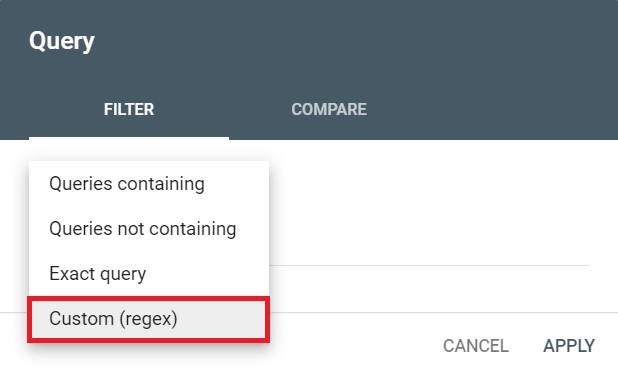
Step 5: Enter the following regular expressions to find long tail keywords:
([^" "]*\s){5,}?It will show you all the keywords with six or more words in them.
^(who|what|where|when|why|how)[" "]It will show you question-based long-tail keywords.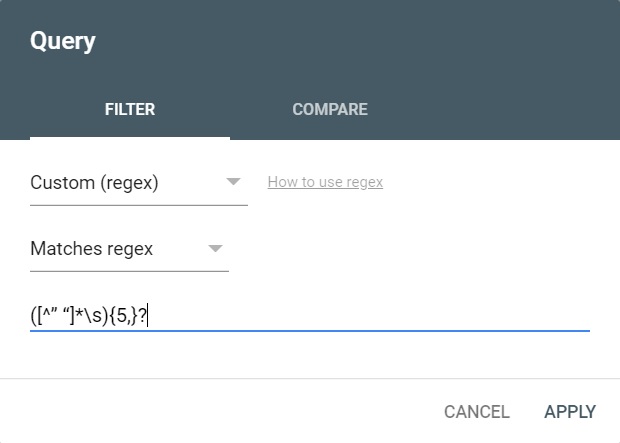
Step 6: You are getting impressions for the given keywords. If you pay attention to them and write some articles on them then you can drive organic traffic to your website.
[/mepr-show]
WordPress Premium Plugins (Free Lifetime License)
SEO
● Rank Math Pro [mepr-show rules=”1417″ unauth=”message”]
Rank Math is a revolutionary and the most powerful WordPress SEO plugin. It is equipped with rank tracking, advanced keyword reports, advanced search engine optimization & many more revolutionary features to multiply your traffic in the easiest way possible.
[/mepr-show]
● SEOPress Pro [mepr-show rules=”1417″ unauth=”message”]
SEOPress Pro is a lightweight, feature-rich, and very easy-to-use WordPress SEO plugin. It has all the features you need to be the first on Google.
Note: This is the PRO version of SEOPress. The free version of SEOPress is required for the PRO to function, which can be installed through your WordPress dashboard.
[/mepr-show]
● Schema Pro [mepr-show rules=”1417″ unauth=”message”]
Schema Pro is an all-in-one schema markup plugin that offers complete functionality and easy configurations. It is a must-have plugin if you’re looking to truly optimize your site for SEO, and make it super easy for Google to understand all your content and its context.
[/mepr-show]
● All In One SEO Pro [mepr-show rules=”1417″ unauth=”message”]
All in One SEO is the best WordPress SEO plugin. It has all the features that make it the most powerful and user-friendly WordPress SEO plugin in the market.
[/mepr-show]
Cache
● WP Rocket [mepr-show rules=”1417″ unauth=”message”]
WP Rocket is a premium caching plugin that helps you improve the speed of your WordPress site, SEO rankings and conversions. WordPress experts recognize it as the most powerful caching tool.
[/mepr-show]
● Asset CleanUp Pro [mepr-show rules=”1417″ unauth=”message”]
Asset CleanUp Pro will help you decrease the number of HTTP Requests. The website page load can be very fast if you just use a caching plugin, but using both plugins, the load speed will be blazing fast.
[/mepr-show]
Page Builder
● Elementor Pro [mepr-show rules=”1417″ unauth=”message”]
Elementor Pro is the most advanced website builder plugin for WordPress, allowing you to visually design forms, posts, WooCommerce, slides and more. It empowers you with vast professional tools that speed up your workflow and design.
[/mepr-show]
● Beaver Builder [mepr-show rules=”1417″ unauth=”message”]
Beaver Builder is a flexible drag and drop WordPress page builder plugin that gives you control over your content and layout. It allows you to easily create beautiful websites and landing pages without writing any code.
[/mepr-show]
● Divi Builder [mepr-show rules=”1417″ unauth=”message”]
Divi is a popular WordPress theme that offers a website-building platform. It has a visual editor option that provides both novices and professionals with the tools necessary to craft engaging, visually appealing websites.
[/mepr-show]
● Oxygen Builder [mepr-show rules=”1417″ unauth=”message”]
The Oxygen builder is a trusted tool that eases the website creation process and single-handedly brings customized changes to the websites via easy drag and drop editing techniques. It combines flexibility with accessibility to allow users to create complex websites without using tens of plugins.
[/mepr-show]
● GeneratePress [mepr-show rules=”1417″ unauth=”message”]
GeneratePress is a beautiful and lightweight WordPress theme that is built for best user SEO usability in mind. Being multipurpose, you can use this theme for any type of sites that you wish for and works with even the simplest of page builders.
[/mepr-show]
● Avada [mepr-show rules=”1417″ unauth=”message”]
Avada’s flexible Advanced Options Network is brought to life with the Avada Drag & Drop visual editor, Header Builder, Layout Builder, and the Footer Builder. Altogether, the Avada Website Builder is the ultimate web design toolkit for your workflow.
[/mepr-show]
Backup & Migration
● BackupBuddy [mepr-show rules=”1417″ unauth=”message”]
BackupBuddy is one of the most well known backup plugins available. When BackupBuddy runs a backup of your site, you can download a zip file of the entire site, so your backups files are always yours.
[/mepr-show]
● UpdraftPlus Premium [mepr-show rules=”1417″ unauth=”message”]
UpdraftPlus Premium lets a WordPress site schedule a backup to several cloud storage services including Dropbox, Google Drive, Microsoft OneDrive, and many others. You can also send your backups to an email address.
[/mepr-show]
● Duplicator Pro [mepr-show rules=”1417″ unauth=”message”]
Duplicator Pro successfully gives WordPress users the ability to migrate, copy, move or clone a site from one location to another and also serves as a simple backup utility.
[/mepr-show]
Website Security
● Wordfence Premium [mepr-show rules=”1417″ unauth=”message”]
Wordfence Security is one of the most full-featured WordPress security plugins available. It enables users to micromanage their site’s security from top to bottom, and even automate it.
[/mepr-show]
● iThemes Security Pro [mepr-show rules=”1417″ unauth=”message”]
The iThemes Security Plugin has a dynamic dashboard with all your WordPress website’s security activity stats in one place, including brute force attacks, banned users, active lockouts, site scan results, and user security stats.
[/mepr-show]
● SecuPress Pro [mepr-show rules=”1417″ unauth=”message”]
SecuPress is a WordPress security plugin. Among its many features, the plugin is able to protect your site by blocking malicious incoming requests.
[/mepr-show]
Membership
● MemberPress [mepr-show rules=”1417″ unauth=”message”]
MemberPress is a WordPress membership site plugin and LMS that makes it easy to charge your users for access to content and digital products such as software, e-books, and online courses you create.
[/mepr-show]
● Restrict Content Pro [mepr-show rules=”1417″ unauth=”message”]
Restrict Content Pro is a premium WordPress membership plugin designed for creating memberships and protecting your site content for paying members.
[/mepr-show]
● ARMember [mepr-show rules=”1417″ unauth=”message”]
ARMember is a WordPress membership plugin, which enables organizations to create recurring subscription plans, manage billing cycles and set up content restriction rules for members.
[/mepr-show]
● Ultimate Membership Pro [mepr-show rules=”1417″ unauth=”message”]
Ultimate Membership Pro is a comprehensive plugin that allows users to fully control their content and sell their subscriptions using multiple payment options.
[/mepr-show]
Affiliate Marketing
● AffiliateWP [mepr-show rules=”1417″ unauth=”message”]
AffiliateWP provides a complete affiliate marketing solution, including referral tracking, integrated payouts, reporting, coupons and more.
[/mepr-show]
● AAWP [mepr-show rules=”1417″ unauth=”message”]
AAWP is a WordPress plugin for better integration of the Amazon Affiliates program within your site. The plugin automatically generates affiliate links and refreshes products, prices and discounts.
[/mepr-show]
● Ultimate Affiliate Pro [mepr-show rules=”1417″ unauth=”message”]
Ultimate Affiliate Pro is an Affiliate WordPress Plugin that allow you to provide a premium platform for your Affiliates with different rewards and amounts based on Ranks or special Offers.
[/mepr-show]
Payments
● WP Simple Pay Pro [mepr-show rules=”1417″ unauth=”message”]
WP Simple Pay is a WordPress payments plugin that allows you to accept one-time payments and recurring payments through your website, designed to work specifically with the Stripe payments service.
[/mepr-show]
● WPPayForm Pro [mepr-show rules=”1417″ unauth=”message”]
WPPayForm is the most advanced WordPress payment plugin for Stripe and PayPal users. With this easy to use payment form builder, customers can pay you in less than a minute without going to another page.
[/mepr-show]
● WP Full Stripe [mepr-show rules=”1417″ unauth=”message”]
WP Full Stripe offers payment gateway solutions to businesses. It enables acceptance of recurring bills and one-time payments.
[/mepr-show]



Thank you for teaching me so much sir
You never let us down Sir. Thanks for sharing your secrets.
Your Gov and Edu backlink trick is really awesome